PC Laptop Computer Keyboard Repair
From $280
All prices below include parts, installation and GST. The prices are advisory only and are not considered as quotes. The prices may change anytime without notice. We take no responsibility for incorrect pricing on our website.
Have a question? Call 1800 85 83 82 or Request an Estimate
Service Description
PC laptop computer keyboard is used regularly and often can develop issues.
Common PC laptop computer keyboard problems are:
- Some keys are not working properly. For example, no response when a key is pressed, or pressing a key outputs something else.
- Jammed key, eg you get “aaaaaaaaaa” when you’ve pressed the A key only once.
- The entire keyboard stops working.
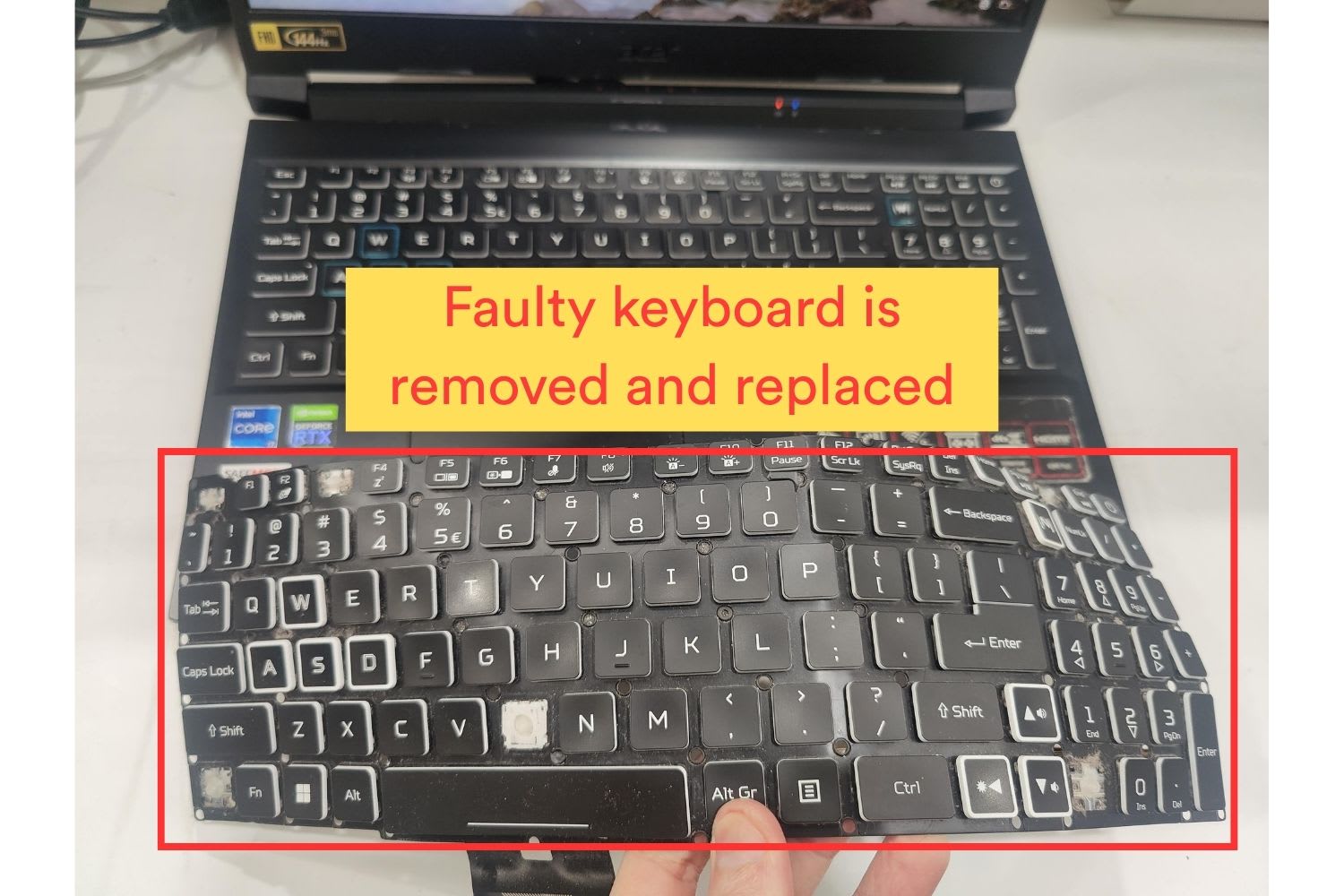
- Key caps are broken and fell off. The whole keyboard needs to be replaced in this case. It’s not possible to replace individual keys.
- Sticky keys after a liquid spill.
To repair the PC laptop computer keyboard, we’ll need to replace it with a new one. This often requires removing almost all internal parts (motherboard, battery, etc) to gain access to the keyboard. This process is time-consuming, technical and too difficult for normal computer users to replace the keyboard themselves. PC laptop computer keyboard replacement should be done by experienced professionals.
Pricing Breakdown
The cost of replacing a PC laptop keyboard typically starts from $280, but the price can go above $350 depending on your laptop’s model, the type of keyboard, and how it’s built into the system.
Here’s how it usually breaks down:
- $280–$320 → For standard non-backlit keyboards found in entry-level laptops. These are typically easier to replace and more affordable.
- $320–$380 → For backlit keyboards, which are more common in mid-range and business-class laptops. The added lighting feature increases both part and labour costs.
- $350-$450+ → For RGB backlit keyboards, ultra-slim laptops, or high-end gaming or productivity models. Some keyboards are integrated into the top case or palm rest, requiring more time and precision to replace.
What affects the cost:
- Backlighting (none, white LED, or full RGB)
- Keyboard layout (standard, compact, or tenkeyless)
- Whether the keyboard is removable or built into the chassis
- The build of your laptop — ultra-slim models or those with unibody construction take longer to disassemble and reassemble
- Part availability for rare or premium models
➡ The more premium or integrated the keyboard, the more expensive and delicate the replacement becomes.
➡ At Safemode, we use high-quality replacement keyboards, and we thoroughly test every key and backlight after installation.
Our Process
- Before replacing a laptop computer keyboard, we first need to inspect and check the current keyboard. This is to ensure that the computer does not have any further major damage, and the keyboard is indeed the fault.
- When a new keyboard is available, we’ll test it by temporarily plugging it into the computer first to make sure the new keyboard works as expected.
- We disassemble the computer base to disconnect its battery from the motherboard. This is to ensure there is no power to the computer to avoid electrical damage during the keyboard replacement process.
- For most computer models, the keyboard is not easily removable. Almost every other part must be removed first, including the battery, motherboard, fans, speakers, hard drive or SSD, keyboard metal backing plate, etc. This is a time-consuming process and requires a lot of experience to get it right.
- Depending on how the keyboard was assembled by the manufacturer, we remove it by removing its screws, or by brute force to rip the old keyboard out if necessary.
- If everything looks good, we’ll begin final installation, securing the new keyboard to its upper frame.
- Final testings are done to ensure everything still works as expected before final assembly is carried out.
The Technical Stuff
PC laptop keyboards come in many types:
- Backlit and non-backlit keyboards. Backlit keyboards can light up in the dark, making it easier for you to type at night.
- US, Australian layout keyboards are different from other keyboards (eg UK layout). They are not interchangeable.
- Some keyboards might include a power button to turn on the computer.
- RGB backlit keyboards are more expensive.
- Gaming laptop keyboards are more difficult to replace.
- Keyboard keys cannot be replaced individually. The keys are part of the keyboard. Even if only one key stops working, the whole keyboard will need to be replaced.
- Many keyboards look the same on the surface, but their key caps are not interchangeable because the small plastic brackets underneath have small differences.
The majority of keyboards are not interchangeable. The new keyboard must be the same as the original keyboard to avoid incompatibility.
Our Difference
Preparation, thorough research and testing are the key. We spend half of the time on testing before ordering a new replacement keyboard, during new keyboard installation, and after installation to ensure the best PC laptop computer keyboard repair.
We have seen many loosely fitted keyboards by inexperienced technicians. Our experience is important to ensure that we pick the correct keyboard and the best computer keyboard repair for our customers. Our technicians have completed thousands of keyboard replacements. This helps us install the new keyboard securely into its frame so that the keys are not wobbly.
We work closely with our trusted suppliers to ensure their new keyboards are high-quality, original manufacturer parts, and come with an easy advance replacement in the event of warranty claims.